RadarOmega: Doppler Radar App
- 3.2
- Rating
- 100.00K
- Installs
- $8.99
- Price
 Analysis by App-foxy
When I use a weather app, I usually want an answer to a very practical question: is that dark patch on the radar heading toward me, and how seriously should I take it? RadarOmega: Doppler Radar App is built around that question. Rather than treating weather as a simple temperature card, it puts live local radar and severe-weather awareness at the center of the experience. That makes it especially interesting for people who need to watch changing conditions instead of checking the forecast once in the morning.
My overall impression is that this is a focused weather tool with a more serious feel than a typical daily forecast app. The developer, SDS Weather INC, has made something aimed at radar watchers, storm-sensitive households, travelers, and anyone who wants to follow developing weather visually. It is not automatically the best choice for someone who only wants tomorrow’s high and low, but it can be much more useful when timing matters.
Why live radar is the real reason to use it
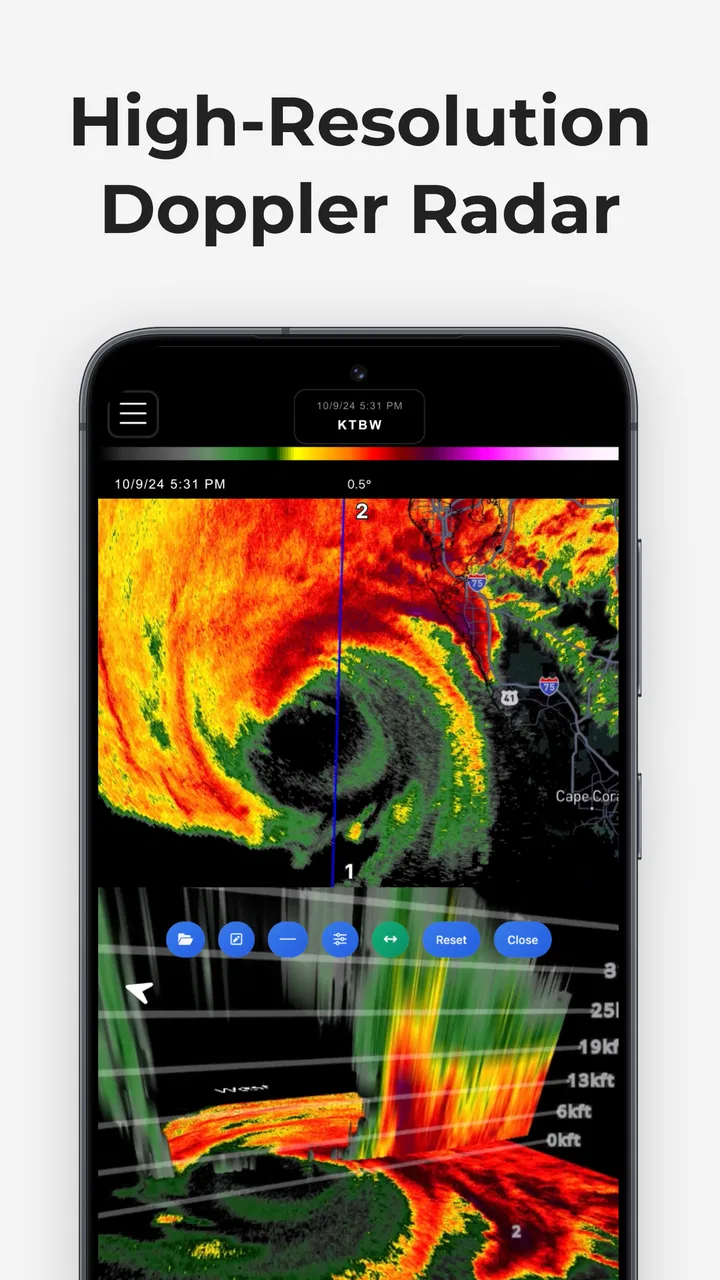
The main capability is the combination of live local radar, severe-weather tracking, and emergency alerts. Those three pieces work together: the radar helps me see what is happening, the severe-weather view gives the situation more context, and alerts can draw attention to urgent changes. The result is less about reading a static forecast and more about following weather as it moves.
You May Also Like

 Blood Strike: 2.5 Anniversary
Blood Strike’s Loadouts Turn Every Drop Into a Tactical Gamble
A close look at Blood Strike’s custom loadouts: how fast access to signature weapons reshapes its battle royale rhythm, rewards preparation, and narrows the gap between fights.

 Pandora - Music & Podcasts
Pandora’s Music Is Easy to Start, but Harder to Recover
Pandora’s strength is its low-effort path from a seed to a station. Its weak spot is how much confidence it asks you to place in connection, setup, and quiet recovery.

 8 Ball Pool
 Is Built on Rivalries, Rematches, and Routine
A close look at the rivalries, rematches, shared routines, and unanswered safety questions that turn a quick pool match into a persistent mobile community.

 Samsung Music
’s Quiet Strength Is Playing What You Already Own
Its reach comes less from spectacle than from dependable access to a personal library. That simplicity is both the app’s strongest retention engine and its ceiling.

 AccuWeather: Weather Radar
AccuWeather Review: A Quick, Clear Forecast for Everyday Decisions
For everyday plans, the best forecast is the one you can understand quickly. AccuWeather makes rain timing, radar, and local conditions easy to act on, with a few trade-offs.

 Hill Climb Racing
Why Hill Climb Racing Still Turns Crashes Into One More Run
A tiny car, a bumpy hill and one more upgrade: Hill Climb Racing keeps resurfacing because its simple chaos makes every near-miss feel personal.
More From Our News Desk



That distinction matters during fast-changing conditions. A normal forecast may say there is a chance of rain during the afternoon, but it does not always answer whether I should leave now, wait twenty minutes, or take a different route. A radar-centered app gives me a visual way to judge the movement and concentration of precipitation around my location.
I also like that the app’s purpose is clear from the first use. It is not trying to be a news feed, a lifestyle dashboard, or a collection of unrelated widgets. The experience is organized around weather awareness. For me, that makes it easier to return to when conditions are uncertain, because I know what kind of information I am going to find.
The emergency-alert angle is important, but I would not treat any phone app as a replacement for official local warnings or common sense. An alert can help me notice a developing problem, while local authorities and emergency services remain the better source for instructions. RadarOmega is most valuable as an additional layer that helps me understand what is happening around those warnings.
Its store rating sits at a 3.2 average from around 1,600 ratings, and that tells me the app is not a universally effortless experience. I can understand why. A radar-focused tool asks more from the user than a basic weather app, and people who open it expecting a simple forecast may find the interface or information density less comfortable.
Reading the radar without getting lost
The first useful habit is to stop treating the radar as a single yes-or-no rain indicator. I use it to look for direction, coverage, and gaps. A large colored area does not necessarily mean the same conditions everywhere inside it, and a narrow gap may close or shift before I reach it. The app becomes more helpful when I compare the current picture with the movement shown over time rather than staring at one frame.
That is one of the less obvious strengths of a radar-first design: it encourages better timing decisions. If I am deciding whether to walk, cycle, drive, or postpone an outdoor task, I can check whether the weather is approaching, already overhead, or moving away. This is more actionable than a broad statement such as “showers possible.”
Another useful approach is to zoom out before zooming in. When I start too close to my street, I may focus on a small patch and miss the larger system feeding it. I prefer to inspect the wider pattern first, then return to my local area for the decision that matters. That simple workflow makes the map less overwhelming and helps prevent false confidence from a temporary gap.
For anyone new to radar, the colors should be treated as an indication of intensity rather than a promise about exactly what will happen at ground level. Radar interpretation has limits, especially when conditions change quickly or when the map shows a broad area that contains several different rain rates. The app can improve awareness, but it cannot remove uncertainty from weather.
What alerts add to the radar view
Alerts are most useful when I am not actively watching the map. A radar screen helps when I choose to open it, while an emergency notification can interrupt that routine when something important develops. That makes the app more practical for people who work, travel, sleep, or simply cannot keep checking the screen.
I would still use alerts as a prompt to investigate, not as the complete explanation. If I receive one, my next step would be to open the radar, check the affected area, and compare the warning with my plans. Someone at home may only need to stay indoors, while someone driving or working outside may need to change the plan immediately.
This is also where notification discipline matters. Weather alerts can become stressful if I treat every message as equally urgent. I would keep the app for meaningful emergency awareness but avoid using it as a reason to constantly monitor every minor change. The benefit comes from having a reliable trigger for attention, not from living inside the radar screen.
How I would use it during an ordinary day
Imagine I have arranged an outdoor appointment in the afternoon. A basic forecast says rain is possible, but that does not tell me whether the appointment is likely to be interrupted. I would open RadarOmega before leaving, look at the broader radar pattern, and follow the movement toward the meeting area. If the rain band is moving away, I may continue. If it is building and heading directly toward the route, I have useful reason to leave earlier, carry protection, or reschedule.
The same process works for a longer drive. I would not use the app as a complete navigation system, but I could use it before departure to identify weather that may affect the journey. If the route crosses a developing storm area, the radar gives me another reason to pause and check official road information rather than relying on a clear-looking forecast from several hours earlier.
For families, the strongest use is preparation. A parent planning a school pickup, sports practice, or outdoor event can look beyond the temperature and ask whether the weather is moving toward the location. Someone who cares for animals, maintains outdoor equipment, or works in a field-based job may also gain more from a live radar view than from a once-daily forecast.
Storm enthusiasts are another natural audience. The app gives them a way to follow weather systems as they develop instead of waiting for a summary after the event. That does not make every interpretation correct, but it makes the experience more immediate and visual. I can see why a person who regularly watches severe weather would open this much more often than a casual forecast app.
There is a useful distinction between planning and reacting. For planning, I would check the radar before committing to an activity and again shortly before leaving. For reacting, I would use alerts and the current map to decide whether to shelter, delay travel, or contact someone. Keeping those two purposes separate prevents me from expecting one screen to answer every weather question.
Where it differs from ordinary weather apps
Most everyday weather apps are designed to answer quick questions about current temperature, hourly conditions, and the next few days. That is convenient, and for many people it is enough. RadarOmega takes the opposite priority: it makes the changing weather picture more important than the simple forecast card.
That difference is its advantage and its cost. If I want to know whether I need a jacket tomorrow morning, a simpler app may be faster. If I want to understand whether rain is approaching my neighborhood right now, the radar-focused approach is more useful. I would not replace every weather tool with this one; I would choose it when live conditions matter more than a clean summary.
The app is also less suitable for someone who dislikes maps or visual data. A radar display can feel busy, particularly when I am only looking for a quick answer. The learning curve is not necessarily difficult, but it is real. I need to spend a little time understanding what I am seeing instead of expecting the app to translate every situation into one plain sentence.
That trade-off makes the purchase decision important. The listed price is $8.99, while in-app purchases range from $4.99 to $359.99 per item. Because of that pricing structure, I would examine the available purchase choices carefully before committing. A person who only checks weather occasionally may find the cost harder to justify than someone who depends on radar and alerts for regular decisions.
The app is marked for Everyone, which makes it broadly accessible from an age-rating perspective, but accessibility in practice is more than an age label. A beginner may still need time to become comfortable with radar interpretation. I would recommend starting with one simple routine—check the local map before an outdoor plan—rather than trying to understand every layer immediately.
Small habits that make the app more useful
My first tip is to check the map at two different scales. The close view helps with local timing, while the wider view shows whether the weather is part of a larger line or cluster. Looking at only one scale can produce a misleading impression, especially when a small clear area sits inside a much bigger system.
My second tip is to compare the radar with the real sky and official warnings. If the map suggests conditions are changing but the local view looks calm, I would not assume one source is automatically wrong. Weather data and what I see outside can differ by timing and location. Using the app as one part of a decision is more sensible than treating it as an unquestionable forecast.
My third tip is to use the app before the pressure of a decision arrives. Opening it for the first time while already driving toward a storm is a poor workflow. I would explore the map at home, learn how to locate my area, and decide what information I actually need. That preparation makes the app faster and less stressful when weather becomes serious.
A fourth practical insight is that alerts and radar serve different jobs. Alerts are for getting my attention; radar is for understanding the surrounding situation. If I rely on only one of them, I lose part of the value. An alert without context can be alarming, while radar without alerts requires me to remember to look.
Limitations I would consider before paying
The biggest limitation is focus. This is not the app I would choose if my priority were a friendly, minimal forecast with a large temperature number and almost no interpretation required. Its radar-centered identity means that the experience can feel excessive for simple daily checks.
The second limitation is that radar does not equal certainty. It can show movement and intensity, but weather systems can change, and the map should not be used to make risky choices such as driving into dangerous conditions. The app helps me make a better-informed decision; it does not guarantee that the decision will be right.
The price and purchase range also deserve attention. With a base price of $8.99 and additional items listed between $4.99 and $359.99, the financial commitment may be disproportionate for casual users. I would consider how often I need live radar before buying. Someone who checks weather twice a week may be happier with a conventional free or lower-cost option, while a frequent storm watcher may see more value.
The average rating of 3.2 suggests that expectations should be realistic. I would not interpret that number as proof that the app is poor, but I would take it as a reason to approach the interface and pricing with care. Radar tools often appeal strongly to a specific group while frustrating people who want simplicity, so a middling overall rating can reflect that divide.
Device compatibility is another practical point. The minimum operating system is 7.0, and the current version is 5.5.3. That gives the app a relatively broad software baseline, but I would still keep the operating system updated where possible. Weather tools are most useful when they remain dependable during the situations in which I need them, so stability matters more than having an old device barely meet the requirement.
Who gets the most from this radar-first approach
I think the best match is someone who regularly needs to make decisions around changing weather. That includes outdoor workers, event organizers, commuters, drivers who plan around storms, parents coordinating activities, and people who live in areas where severe weather can develop quickly. For these users, seeing the movement of weather can be more valuable than reading a general forecast.
It also suits users who enjoy learning how weather behaves. If I like watching storm systems, comparing the current map with what I see outside, and checking conditions throughout the day, the app gives me a more involved experience. The value grows with attention: the more I use the radar thoughtfully, the more useful its visual information becomes.
I would recommend caution to people who are anxious about weather. Frequent alerts and constant radar checking can increase worry rather than improve preparedness. In that case, a simpler forecast routine combined with official emergency guidance may be healthier. RadarOmega can support sensible preparation, but it should not become a reason to monitor every cloud.
I would also steer away from it if my only requirement were a quick forecast for the next morning. A conventional weather app is likely to be quicker, clearer, and less expensive for that purpose. The decision comes down to whether I need a weather summary or a live situational tool. Those are different jobs, and this app is much better at the second one.
For me, the strongest case is built around timing. When I need to know whether weather is moving toward a place, how broad the system is, and whether an alert deserves immediate attention, a radar-first app earns its place on my phone. When I only need a temperature and a chance of rain, it is more capability than I need.
My final take on RadarOmega
RadarOmega: Doppler Radar App is a specialized weather app rather than an all-purpose forecast companion. Its real strength is giving live radar a central role in everyday decisions, especially when conditions are changing too quickly for a static forecast to feel sufficient. The combination of visual tracking and emergency awareness can help me plan more intelligently, provided I understand the limits of radar.
I appreciate that it encourages a more informed workflow: check the wider system, inspect the local movement, consider alerts, and then compare everything with official guidance and what is happening outside. That is more useful than simply glancing at a weather icon. At the same time, the information density, the paid structure, and the need to interpret the map mean it is not an automatic recommendation for everyone.
My honest recommendation is simple: choose it if live local radar is central to your routine and you are willing to spend time learning the display. Skip it if you want a lightweight forecast or if the listed price and possible in-app purchases feel excessive for occasional use. For the right person, the important benefit is not another temperature reading, but a clearer view of changing weather before it disrupts the day.
FAQs for RadarOmega: Doppler Radar App
01What is RadarOmega: Doppler Radar App used for?
RadarOmega is a weather-monitoring app designed for users who want detailed radar information rather than only a basic daily forecast. It provides access to interactive radar imagery, weather alerts, storm tracking tools, forecast information, and other atmospheric data. The app can be especially useful during thunderstorms, hurricanes, tornadoes, and winter weather, although the amount of information may feel overwhelming for casual users.
02Does RadarOmega provide real-time weather radar and severe weather alerts?
RadarOmega offers frequently updated radar imagery and weather information intended to help users follow developing conditions. Depending on the selected data source, region, and subscription level, update speed and available features can vary. Severe weather alerts may also depend on official warning agencies and device notification settings, so the app should be treated as a supplementary monitoring tool rather than a replacement for local emergency alerts or official instructions.
03Is RadarOmega free to download, and does it require a subscription?
The app can generally be downloaded without paying upfront, but some advanced features may be restricted by a premium purchase, subscription, or separate tier. These features can include enhanced radar products, additional weather layers, longer data histories, specialized tools, or expanded alert options. Before downloading or subscribing, users should check the current pricing, trial conditions, renewal terms, and exact feature differences listed on the relevant app store.
04Can RadarOmega be used outside the United States?
RadarOmega may be useful internationally, but its coverage and feature availability are not necessarily identical in every country. Radar stations, warnings, forecast data, map layers, and storm-tracking capabilities depend on the region and the data providers supported by the app. Users outside the United States should verify that their local radar and alert information is available before relying on the application for regular weather monitoring.
05Does RadarOmega work without an internet connection or with limited connectivity?
RadarOmega relies heavily on an internet connection because radar imagery, forecasts, alerts, and map layers must be downloaded or refreshed from online data sources. Some previously loaded information may remain visible temporarily, but users should not expect the app to provide complete offline weather monitoring. A stable connection is particularly important during severe weather, and official emergency communication methods should remain available as a backup.
Pros
- Detailed Doppler radar layers help track storms in real time.
- Custom alerts can warn you about nearby severe weather.
- Supports multiple map overlays
- including wind and lightning data.
- Useful for storm chasers
- outdoor plans
- and weather enthusiasts.
- Radar data is presented with smooth animation and frequent updates.
Cons
- Many advanced radar tools require a paid subscription.
- The interface may feel overwhelming for casual weather users.
- Live radar performance depends heavily on your internet connection.
- Battery use can increase when tracking maps continuously.
- Forecast accuracy and coverage may vary by location.

RadarOmega: Doppler Radar App
Gallery